
Typing Wrist Pain: What Causes It and How to Type Without Hurting Yourself
Wrist pain from typing is one of those problems that creeps up slowly and then suddenly becomes impossible to ignore. One day you notice a dull ache after a long session. A few weeks later it is there every morning. A few months after that, it is affecting your work.
The good news is that most typing-related wrist pain is preventable — and much of it is reversible. The causes are well understood, the fixes are practical, and none of them require expensive equipment or medical intervention in the early stages.
What Actually Causes Wrist Pain When Typing
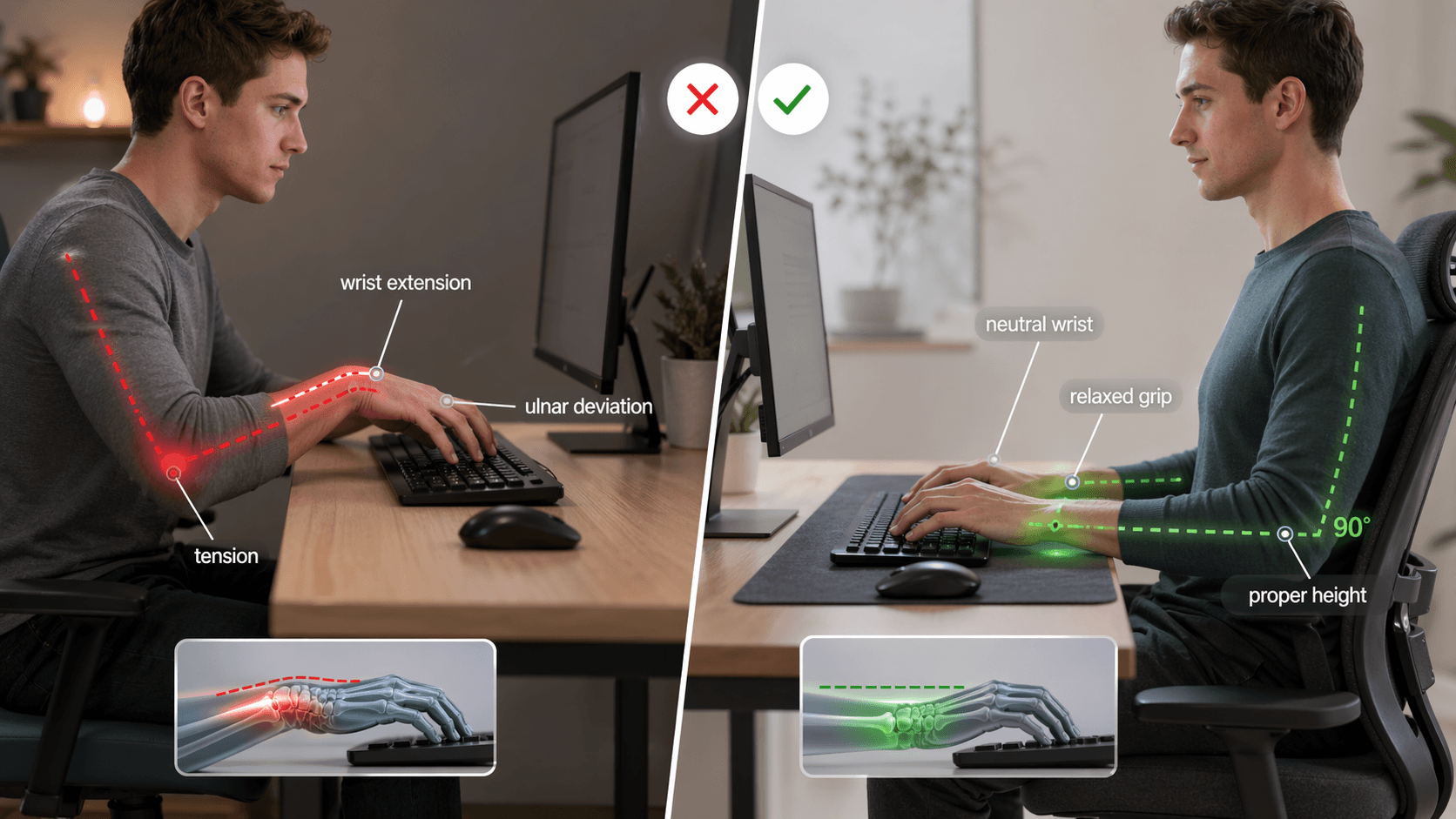
The most common cause is sustained wrist extension: holding your wrists bent upward while your fingers work the keys. This position puts the tendons and median nerve inside the carpal tunnel under constant low-grade tension. Over hours, and over months, that tension adds up.
The second common cause is resting your wrists on the desk or a wrist rest while actively typing. This feels like support, but it actually compresses the underside of the wrist against a hard surface during keystroke movements. Wrist rests are designed for pausing between bursts of typing — not for contact during active typing.
A third cause is keyboard height. If your keyboard is positioned too high — wrists angling upward to reach the keys — every session works against you. The correct position has your elbows at roughly 90 degrees and your wrists in a neutral, flat line from elbow to fingertip.
Finally, tension accumulation plays a significant role. Many typists, especially when focusing hard or working fast, unconsciously clench their forearms and press their wrists down. This tension compounds throughout a session. By the end of a long workday, what started as mild tightness can become genuine pain.
The Difference Between Fatigue and Injury
Not all wrist discomfort is injury. Muscle fatigue after an unusually long typing session is normal, especially if your technique is not yet solid. It typically resolves with rest overnight.
Warning signs that indicate something beyond normal fatigue include pain that persists after rest, numbness or tingling in the fingers (especially the thumb, index, and middle fingers — the median nerve distribution), a burning sensation in the wrist or forearm, or pain that wakes you up at night.
Persistent tingling and numbness in those specific fingers is the classic symptom of carpal tunnel syndrome, which involves compression of the median nerve. If you have these symptoms, see a doctor before attempting to push through with more typing. Early intervention with carpal tunnel is far more effective than late-stage treatment.
For everything short of those warning signs, the adjustments below are the right starting point.
Posture and Setup: The Foundation
The single most impactful change most people can make is fixing their physical setup. Good technique on a bad ergonomic setup will still cause pain over time.
Keyboard height and angle. Your keyboard should sit at a height where your elbows are at approximately 90 degrees and your wrists are flat — not angled up or down. Many desks are too high for comfortable typing, which is why adjustable-height desks and keyboard trays exist. If your desk is fixed, a chair with adjustable height is the alternative. A slight negative tilt on the keyboard (front edge higher than back edge) encourages neutral wrist position and is worth experimenting with.
Chair height and posture. Sit with your back straight and supported, feet flat on the floor, and your monitor at eye level. Slouching or hunching forward pulls the shoulders down and inward, which transfers tension down the arms to the wrists.
Wrist position during typing. Your wrists should hover lightly above the keyboard — not resting on the desk, not resting on a wrist pad, not pressing down. The only time wrists make contact with a surface is during pauses. During active typing, they float.
Technique Adjustments That Reduce Strain
Beyond setup, how you type matters as much as where you type.
Keep wrists neutral. The most common mechanical cause of strain is ulnar deviation — bending the wrists outward so the hands angle toward the little finger side. This often happens when the keyboard is too wide or when the hands are reaching toward the outer keys. Keeping elbows closer together and using home row positioning consistently reduces this.
Reduce keystroke force. Most typists press far harder than necessary. Modern keyboards require very little force to actuate — often just 45–60 grams. Typing with light touch rather than hammering the keys reduces the cumulative impact load on your tendons across a full session.
Take micro-breaks. The research on repetitive strain injuries consistently shows that frequent short breaks are more effective than infrequent long ones. A 30-second break every 20–25 minutes — stand up, shake out your hands, roll your wrists — does more to prevent strain than a 15-minute break every 2 hours. Set a timer if you need the reminder.
Stretches and Exercises That Actually Help
These are the exercises most consistently recommended by occupational therapists for typing-related wrist discomfort.
Wrist extension and flexion stretch. Hold one arm out in front of you, palm facing down. Use your other hand to gently press the fingers downward, stretching the top of the wrist. Hold for 15–20 seconds. Then flip the hand (palm up) and press the fingers back toward you to stretch the underside. Repeat on both wrists. Do this before and after long typing sessions.
Finger fan and fist. Spread your fingers as wide as possible, hold for 5 seconds, then make a loose fist and hold for 5 seconds. Repeat 10 times per hand. This activates the small muscles of the hand and counteracts the static contracted position of typing.
Forearm rotation. With arms bent at the elbow, rotate your forearms slowly from palm-up to palm-down and back. 10 slow rotations on each arm. This mobilizes the radioulnar joint, which tightens significantly during prolonged typing.
Wrist circles. Slowly rotate each wrist in full circles — 10 in each direction. Focus on smooth, full-range movement rather than speed.
When to Stop and Seek Help
If wrist pain has been present for more than two weeks despite rest and setup corrections, or if you have any of the nerve symptoms described above (numbness, tingling, burning), consult a doctor or physiotherapist. Carpal tunnel syndrome, tendinitis, and De Quervain's tenosynovitis are the most common diagnoses for typing-related wrist problems, and all three respond well to early treatment.
Do not try to type through persistent nerve symptoms. Compression injuries that are ignored tend to escalate, and the recovery timeline lengthens significantly once the damage is established.
For the large majority of typists who have discomfort but no nerve symptoms, consistent attention to setup, technique, and daily stretching will resolve the problem within a few weeks.
Take a free typing test to check your speed and identify technique issues →
About the author
Louis
Louis is a developer and productivity tools creator who built Typingverified to help professionals build verifiable typing skills. He writes about typing techniques, productivity, and keyboard ergonomics based on hands-on testing and research.
Email: support@typingverified.com
More articles
The Complete Beginner's Guide to Touch Typing in 2026 (Start to Certificate)
Everything you need to know about learning touch typing in 2026, from your first home-row practice to earning a professional typing certificate.
30 Typing Practice Sentences That Will Improve Your WPM Fast
Looking for typing practice sentences that actually improve your speed? Here are 30 carefully chosen sentences targeting accuracy, speed, and common word patterns.
The Best Keyboards for Typing Speed in 2026 (Tested & Ranked)
Does your keyboard affect your typing speed? Yes — significantly. Here are the best keyboards for fast typing in 2026, ranked by performance and value.