
5 Typing Habits That Are Secretly Slowing You Down
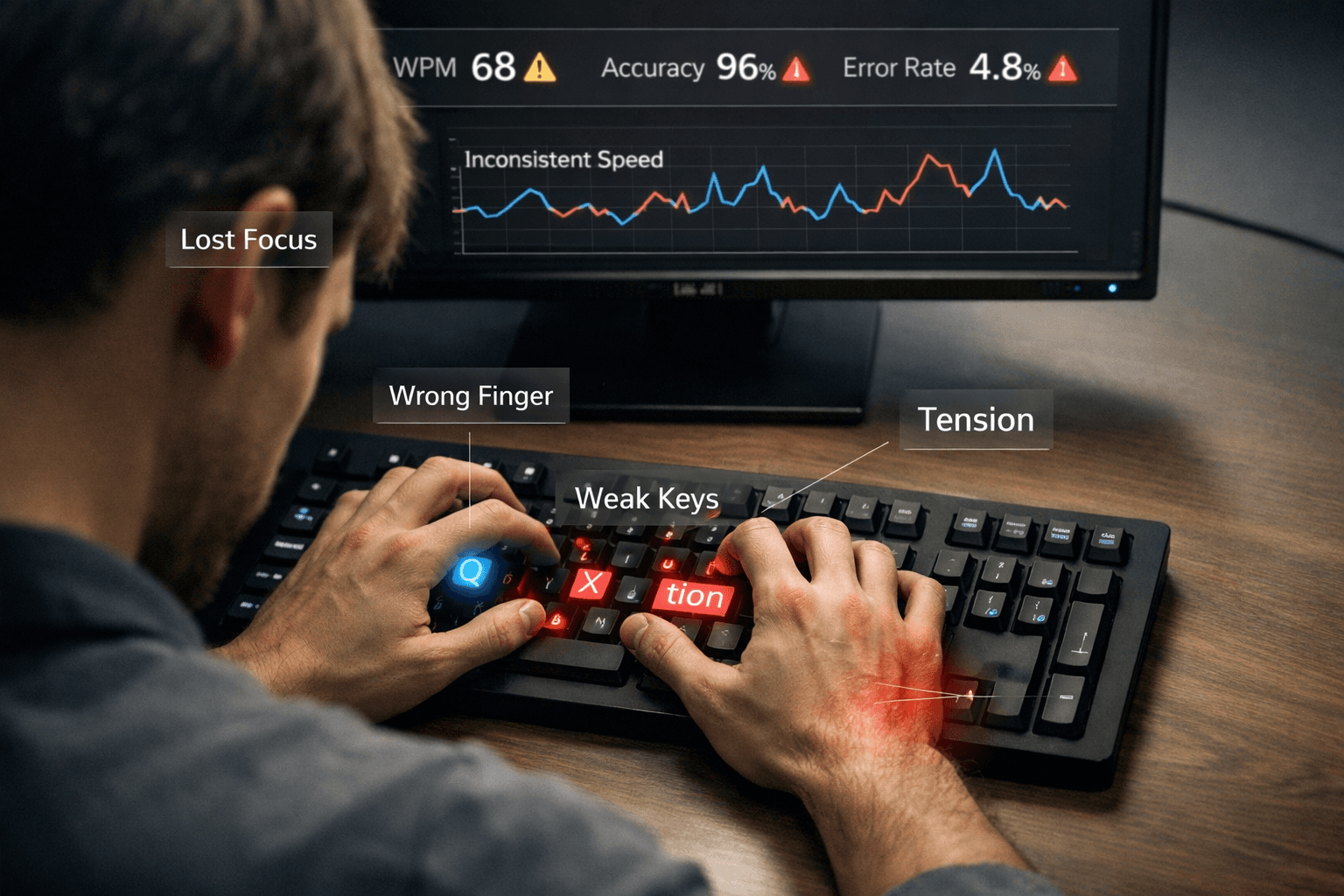
You might be practicing wrong. These 5 common typing habits are silently limiting your speed and accuracy — and most typists don't even know they're doing them.
If you have been typing for years and your speed has plateaued, the problem is probably not practice volume. It is almost certainly one of these five habits working against you. More practice on top of a bad habit doesn't fix the habit — it reinforces it. Understanding exactly what's holding you back is the first step to breaking through.
Habit 1: Looking at the Keyboard
This is the single most speed-limiting habit in typing, and it's far more common than most people realize. Every time your eyes drop from the screen to the keyboard, you break your reading flow and introduce a visual interruption that costs you 0.5–1.5 seconds per occurrence.
At moderate typing speeds, this can happen dozens of times per minute, translating into constant micro-pauses that cap your maximum speed well below your actual potential. But the damage goes deeper than just lost seconds. Looking at the keyboard also disrupts your ability to read ahead — the mental process of processing the next word or phrase while your fingers are still finishing the current one. Skilled typists read 2–3 words ahead of where they're currently typing. That buffer disappears the moment your eyes leave the screen.
The habit is also self-perpetuating. The more you look, the less your brain develops the spatial awareness — the sense of exactly where each key is without needing to see it — that touch typists rely on. This spatial knowledge, built through repetition, is what allows fast typists to type without conscious thought about finger placement.
Fix: Cover your hands with a cloth or small board while practicing. Commit to zero keyboard glances for one full week. It will feel agonizing for the first few days — your speed will drop, you'll make more errors, and you'll feel the urge to peek constantly. Push through it. By day four or five, your proprioceptive sense of the keyboard will start kicking in. By the end of the week, the speed you lost will return — and keep climbing past where you were before.
Habit 2: Using the Wrong Fingers for Certain Keys
Most self-taught typists have idiosyncratic finger assignments — reaching for keys with whatever finger feels natural rather than the correct one. The problem is that incorrect assignments pull your hand off the home row, requiring extra repositioning time between keystrokes. A single misassigned key can create a small delay on every word that contains it, which at typing speeds amounts to hundreds of small inefficiencies per minute.
Common violations: using the index finger for B (correct) but also stretching it for V and sometimes N. Using the right index finger for both U and Y instead of correctly splitting them. Using the middle finger for keys the ring or index finger should cover. These deviations feel natural because you've practiced them for years — but they carry a real speed cost.
The home row is the foundation of everything. Your eight fingers rest on ASDF and JKL; — the strongest, most central position on the keyboard. Every key assignment in touch typing is designed to minimize how far your fingers travel from that position. When you override those assignments, you add travel distance that compounds across every sentence you type.
Fix: Look up the standard finger-to-key assignment chart and identify where your habits diverge. Don't try to fix everything at once — identify your two or three most frequent violations and drill those specifically. Type slowly and deliberately, enforcing the correct finger on every stroke, until it starts to feel natural. This process is uncomfortable. It will temporarily lower your speed. But the ceiling you unlock on the other side is worth it.
Habit 3: Tensing Your Wrists and Forearms
Tension is the enemy of speed. When you tense up — whether from trying to type fast, from deadline stress, or from poor desk ergonomics — your fingers become less fluid, your reaction time slows, and your error rate rises. The harder you try, the worse the result, which creates a frustrating feedback loop that traps many typists at intermediate speeds.
There's a well-documented phenomenon in motor learning where attempting to perform a physical skill at maximum conscious effort produces worse results than relaxed, automatic execution. Typing is no exception. The fastest typists describe the experience as effortless — their hands move without deliberate thought, which is only possible when the muscles are loose.
Poor desk setup amplifies the problem. If your keyboard is too high, your wrists angle upward to type, creating chronic tension in the forearms. If your chair is too low, your shoulders hunch. These ergonomic issues are slow and subtle — they don't cause immediate pain, but they create a background tension that limits your speed ceiling and, over time, increases your risk of repetitive strain injury.
Fix: Before any typing session, shake out your hands and roll your wrists for 30 seconds. During practice, consciously check in with your forearm tension every few minutes. Your wrists should hover lightly above the keyboard, never pressed or resting against it. If you notice your shoulders rising toward your ears, stop and reset. For ergonomics: your elbows should be at roughly 90 degrees when typing, your monitor at eye level, and your feet flat on the floor.
Habit 4: Ignoring Your Weak Keys and Key Combinations
Every typist has specific keys or letter combinations that consistently slow them down — Q, X, Z, double letters, or combinations like "tion," "ough," "str," or "wh." The natural instinct is to work around them by mentally slowing down when you sense them coming. This avoidance strategy doesn't fix the underlying problem. Your overall typing speed is always limited by its slowest elements, not its fastest.
Think of it like a chain — your typing speed ceiling is set by the weakest links in your muscle memory. A typist who handles 90% of keys at 100 WPM but hesitates on 10% of them will never sustain 100 WPM in real writing, regardless of how much general practice they do.
The specific weak points vary by person. Left-hand typists sometimes have weaker right-hand keys and vice versa. People who grew up typing on mobile first often have weak pinky fingers because mobile keyboards don't require them. The only way to identify yours is to pay attention to where errors cluster and where rhythm breaks.
Fix: During practice sessions, note which keys or combinations cause you to pause, error, or slow down. Write them down. At the start of each session, spend 3–5 minutes drilling those specific combinations — not full words or paragraphs, just the problem sequences repeated until they feel smooth. This targeted approach produces faster improvement than general typing practice because it addresses your actual limiting factors directly.
Habit 5: Always Practicing at Maximum Effort
Trying to type as fast as possible every single practice session is one of the most common mistakes intermediate typists make. It seems logical — push hard, get faster. But speed practiced with errors doesn't build good habits. It builds fast, inaccurate ones. Your fingers learn not just the keystrokes but also the errors and hesitations that accompany them.
There's a principle in motor skill development that accuracy must precede speed. If you practice a movement incorrectly at high speed, you're laying down muscle memory for the incorrect movement. Undoing that later is harder than learning it correctly the first time.
An accuracy rate below 95% during practice means you're spending a significant portion of your training time reinforcing mistakes. An accuracy rate of 97%+ means nearly every repetition is a correct one — which is what builds the reliable, automatic muscle memory that fast typists depend on.
Fix: Practice at 80–85% of your maximum speed with a strict accuracy target of 97% or higher. If your accuracy drops below that, slow down until it stabilizes. Reserve full-effort sprints for short bursts — 10–15 seconds at maximum speed — used occasionally as a ceiling test to discover your upper limit, not as your primary training method. The steady, accurate sessions build the foundation. The sprints reveal your progress.
How Long Does It Take to Fix These Habits?
The timeline depends on how deeply ingrained each habit is, but most typists see measurable change within two to four weeks of focused correction. Eliminating keyboard glances typically produces visible results within 5–7 days once you commit to it fully. Correcting finger assignments takes longer — two to three weeks of deliberate slow drilling before the new pattern starts to feel natural rather than forced.
The most important thing to understand is that the improvement is not linear. You will often feel like you are getting worse before you get better, because relearning a motor pattern requires temporarily slowing down to override the old one. That dip is not failure — it is the correction process working. Trust it, stay consistent, and the speed will return at a higher ceiling than where you started.
Tracking your progress weekly rather than daily helps here. Day-to-day fluctuations can be noisy due to sleep, stress, and test difficulty. Weekly trendlines reveal the real direction. If your weekly average WPM and accuracy are improving, your habits are improving — even when a single bad session makes it feel like you're stuck.
Self-assessment: Which habits are costing you speed?
Answer honestly — yes or no — without judging yourself. Each "yes" is a signal to prioritize that module in your next week of practice.
- Looking down: While typing a normal paragraph, do you glance at the keyboard more than twice per sentence?
- Wrong fingers: Do you sometimes hit B, V, N, or Y with whatever finger reaches first instead of the standard assignment?
- Tension: After 10 minutes of typing, do your shoulders feel elevated or your wrists pressed against the desk edge?
- Avoidance: Do you slow down noticeably before uncommon letters (Q, Z, X) or tricky pairs (tion, ough) instead of drilling them?
- Always sprinting: Do most of your practice sessions feel like "type as fast as possible," even when your accuracy drops below 95%?
How to read your score: Three or more "yes" answers means technique — not lack of practice — is probably your bottleneck. Zero to two "yes" answers means you may need harder content (punctuation, numbers, niche vocabulary) rather than habit correction alone.
How long each habit typically takes to fix
These ranges assume 15–25 minutes of deliberate practice daily. Your mileage varies with how long you've reinforced the wrong pattern.
| Habit | Typical time to meaningful improvement | Notes |
|---|---|---|
| Looking at the keyboard | 5–14 days | Fast feedback once you commit to zero glances |
| Wrong finger assignments | 14–35 days | Slow at first because you must override muscle memory |
| Wrist / shoulder tension | 7–21 days | Often overlaps with ergonomics fixes |
| Ignoring weak keys | 10–28 days | Targeted drills shorten this dramatically |
| Always practicing at max speed | Immediate shift | Slow down today; accuracy rises within one session |
Five-minute drill matched to each habit
Use one drill per session before general practice — treat it like a warm-up.
Habit 1 — Eyes on screen: Cover your hands with a thin cloth. Type three paragraphs of normal text at half your usual speed. If you peek, restart the paragraph.
Habit 2 — Finger map: Open a finger-chart diagram. Type only home row + one correction target (for example B with left index, V with left index) for five minutes without deviation.
Habit 3 — Relax: Set a timer every two minutes during practice. When it rings, drop shoulders, shake hands, reset wrists above the keyboard — never planted.
Habit 4 — Weak pairs: Write down your five worst bigrams from last week's errors. Spend five minutes repeating each bigram slowly until rhythm is even.
Habit 5 — Accuracy ceiling: Cap yourself at 85% of your best known WPM for the whole session. If accuracy dips below 97%, slow down further until it stabilizes.
Final Takeaway
You do not need to type for hours each day to break through a plateau. You need to identify and correct the habits that are quietly taxing every sentence you type. Eliminate keyboard glances, clean up finger assignments, release tension, drill weak combinations, and train accuracy before speed.
Most typists can make meaningful progress within a few weeks once practice becomes deliberate. The key is consistency and correct feedback, not brute force.
Build better habits with free structured lessons on Typingverified →
About the author
Louis
Louis is a developer and productivity tools creator who built Typingverified to help professionals build verifiable typing skills. He writes about typing techniques, productivity, and keyboard ergonomics based on hands-on testing and research.
Email: support@typingverified.com
More articles
The Complete Beginner's Guide to Touch Typing in 2026 (Start to Certificate)
Everything you need to know about learning touch typing in 2026, from your first home-row practice to earning a professional typing certificate.
Typing Wrist Pain: What Causes It and How to Type Without Hurting Yourself
Wrist pain from typing is preventable. Learn the real causes of typing-related wrist pain and the setup, technique, and stretching fixes that actually work.
30 Typing Practice Sentences That Will Improve Your WPM Fast
Looking for typing practice sentences that actually improve your speed? Here are 30 carefully chosen sentences targeting accuracy, speed, and common word patterns.