
How Long Does It Take to Learn Touch Typing? (Realistic Timeline)
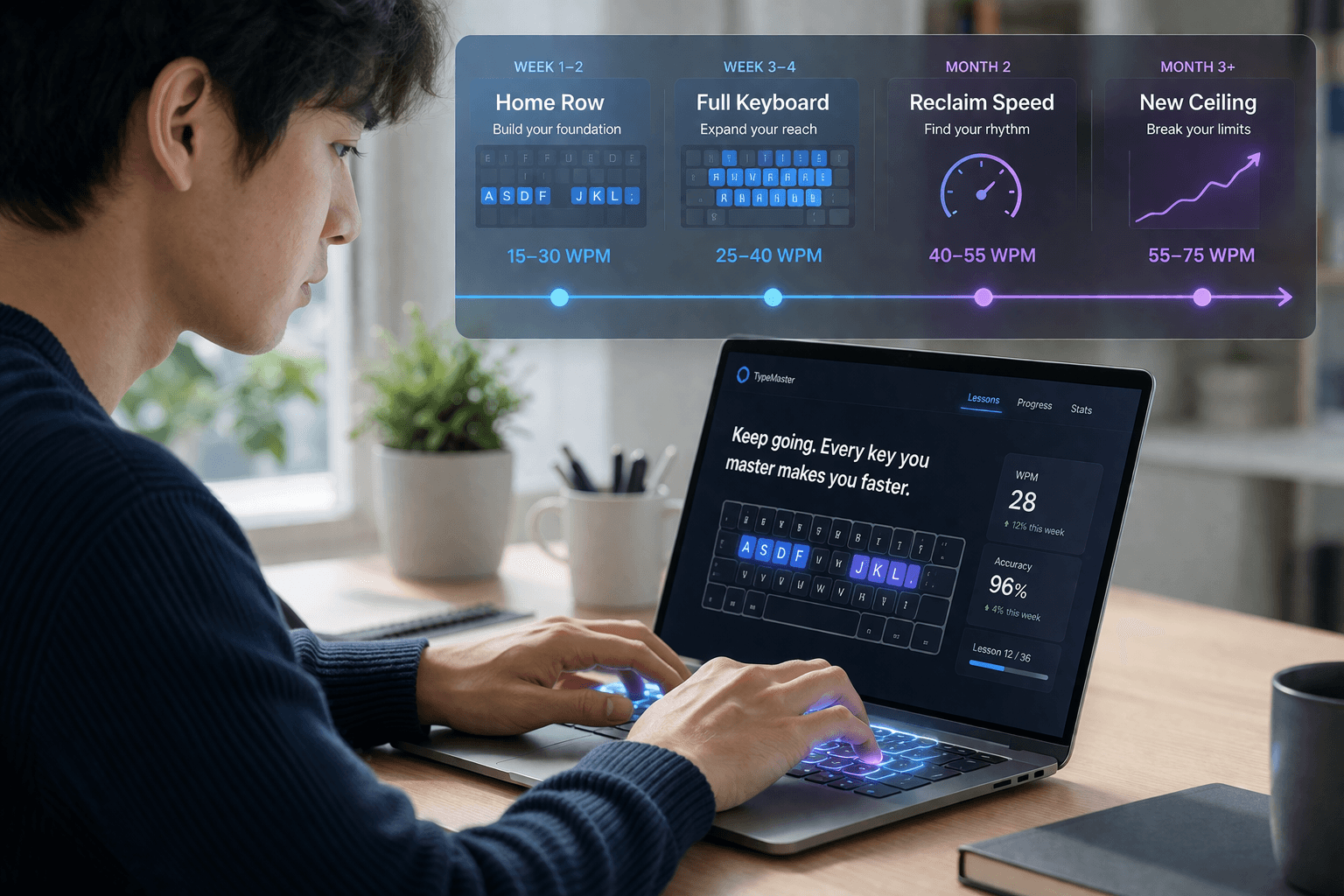
The honest answer: most people can learn the basics of touch typing in 2–4 weeks and reach professional speed within 2–3 months of daily practice. But the timeline depends heavily on what you are starting with, how consistently you practice, and whether you are correcting old habits or building from scratch.
Here is a realistic, phase-by-phase breakdown.
Week 1–2: Learning the Home Row
The first phase of touch typing is the hardest psychologically. You are un-learning habits that have been with you for years and replacing them with a system that initially feels slower and more awkward. Most beginners experience a dramatic dip in speed during this phase — this is completely normal and expected.
Focus entirely on the home row: ASDF for your left hand, JKL; for your right hand. This is where your fingers rest between keystrokes, and every other key on the board is learned as a movement away from and back to this anchor. Do not progress to other rows until you can type home row combinations without looking down and without hesitation.
Expected speed during this phase: 15–30 WPM.
Daily practice needed: 15–20 minutes of structured drills. Quality of attention matters more than duration. Slow, deliberate, accurate practice beats fast, sloppy repetition every time.
Week 3–4: Full Keyboard Coverage
Once the home row is solid, you add the top row (QWERTY, numbers) and the bottom row (ZXCVB, NM,.). Your speed will still be lower than your pre-touch-typing level during this phase, which can feel discouraging. Stick with it — the consolidation phase comes next.
By the end of Week 4, most learners can navigate the full alphabet without looking, at speeds of 25–40 WPM. You will still be thinking about key positions consciously, but the physical movement is beginning to form.
Common mistake: Peeking at the keyboard. Even occasional glancing reinforces the old habit and slows the formation of muscle memory. Cover your hands or use a keyboard cover if you struggle with this.
Daily practice needed: 15–20 minutes.
Month 2: Reclaiming Your Old Speed
This is the phase most learners describe as the turning point. Your muscle memory starts to consolidate, conscious effort decreases, and speed climbs rapidly. Most people match their old hunt-and-peck speed by the end of Month 2 — but now with correct finger placement, better accuracy, and a much higher ceiling ahead.
The difference between Month 2 and earlier phases is qualitative, not just quantitative. You stop thinking about where the keys are and start thinking about the words themselves. This cognitive shift is the whole point of learning touch typing — it frees up mental resources that were previously consumed by the mechanics of typing.
Expected speed: 40–55 WPM.
Daily practice needed: 15–20 minutes of deliberate practice, supplemented by real typing tasks.
Month 3 and Beyond: Building Real Speed
By Month 3, most people are typing faster than they ever could with hunt-and-peck. Speed of 55–75 WPM is typical for consistent learners. The formal practice phase can begin to taper off — normal daily computer use now reinforces and continues building your speed automatically.
At six months of casual daily use following formal training, most people stabilize somewhere between 65 and 85 WPM. This is a meaningful professional speed: it exceeds the industry standard for most office and administrative roles (typically 50–65 WPM), and opens doors to higher-paying positions in data entry, transcription, and remote work.
What separates 65 WPM typists from 85 WPM typists is usually accuracy and rhythm, not raw finger speed. Focus on typing in clean bursts with consistent pacing rather than sprinting and crashing.
Can You Go Faster? The 100+ WPM Path
Reaching 100 WPM requires additional deliberate training beyond Month 3. Most people at this level benefit from:
Targeted weak-key drills. Identify which specific letter combinations slow you down and practice them in isolation. For most people it is rare bigrams like BV, QU sequences, or numbers and punctuation.
Timed tests under pressure. Regular 1-minute and 3-minute timed tests with results tracked over time. You cannot improve what you do not measure.
Eliminating accuracy debt. Reaching 100 WPM with 90% accuracy is much less useful than 85 WPM with 98% accuracy. Net WPM — which penalizes errors — is what employers and typing certifications actually measure.
Realistic timeline to 100 WPM: 6–12 months of consistent practice for most people starting from zero. Some people get there faster; people who already typed quickly hunt-and-peck sometimes take longer because they have deeper habits to unlearn.
What Slows People Down
A few factors consistently extend the learning timeline:
Reverting to old habits under pressure. When you are tired, stressed, or need to type something quickly, the temptation to fall back to two-finger typing is strong. Every time you revert, you undo some of the muscle memory you have built. Commit fully during the learning phase — even if it means typing slower for several weeks.
Inconsistent practice. Two 20-minute sessions per week produce much slower progress than 15 minutes daily. The brain consolidates motor memory during sleep, and daily repetition before sleep is consistently more effective than infrequent longer sessions.
Skipping accuracy in favor of speed. Going as fast as possible and backspacing constantly teaches your fingers to make errors followed by corrections. It does not teach your fingers to get it right the first time. Slow down until your accuracy is above 95%, then gradually increase pace.
How to Know You Are Ready to Certify
A verified typing certificate is useful at any speed above 55 WPM — but the right time to certify is when you have a consistent, reproducible score, not a single peak result. If your average across ten timed tests is 65 WPM with 97% accuracy, that is your certifiable speed. If your average is 62 WPM but your best run was 72 WPM, certify at 62.
The value of a verified certificate is precisely that it reflects a tested, independent measurement — not a self-reported estimate. Employers know that self-reported typing speeds are routinely inflated by 10–15 WPM. A third-party verified score carries significantly more weight on a resume.
Once you reach a professional speed that you can reproduce consistently, earning a certificate converts your practice investment into a professional credential you can use immediately.
Start your touch typing journey today with free structured lessons →
About the author
Louis
Louis is a developer and productivity tools creator who built Typingverified to help professionals build verifiable typing skills. He writes about typing techniques, productivity, and keyboard ergonomics based on hands-on testing and research.
Email: support@typingverified.com
More articles
The Complete Beginner's Guide to Touch Typing in 2026 (Start to Certificate)
Everything you need to know about learning touch typing in 2026, from your first home-row practice to earning a professional typing certificate.
Typing Wrist Pain: What Causes It and How to Type Without Hurting Yourself
Wrist pain from typing is preventable. Learn the real causes of typing-related wrist pain and the setup, technique, and stretching fixes that actually work.
30 Typing Practice Sentences That Will Improve Your WPM Fast
Looking for typing practice sentences that actually improve your speed? Here are 30 carefully chosen sentences targeting accuracy, speed, and common word patterns.